
TablePro
Import RTablePro from @ray-template/ui/table-pro. Ray Admin can also import it from @/components. Columns, selection, sorting, pinning, and virtual scrolling follow Naive UI DataTable. Use bare for a plain table, or add search, pagination, and tools as needed.
Interactive example
Open all live examples for 11 runnable scenarios with steps, expected behavior, and the source that actually runs.
Switch the data source, filter rows, or change pages. In remote mode, changing pages or resubmitting filters quickly cancels the previous query. After simulating a failure, use the retry button in the table.
View example source
<template>
  <DemoFrame :dark="dark" :locale="locale">
    <div class="ray-demo table-demo">
      <fieldset class="ray-demo-group">
        <legend>{{ copy.source }}</legend>
        <div class="ray-demo-options">
          <NRadioGroup
            v-model:value="source"
            :name="id"
            :aria-label="copy.source"
          >
            <NRadio value="local">{{ copy.local }}</NRadio>
            <NRadio value="remote">{{ copy.remote }}</NRadio>
          </NRadioGroup>
          <NCheckbox v-model:checked="virtual">{{ copy.virtual }}</NCheckbox>
        </div>
      </fieldset>
      <NButton v-if="source === 'remote'" size="small" @click="failRequest">
        {{ copy.fail }}
      </NButton>
      <p v-if="source === 'remote'" role="status">
        {{ copy.cancelled }} {{ cancelled }}
      </p>
      <RTablePro
        :key="source"
        :columns="columns"
        :data="source === 'local' ? rows : []"
        :request="source === 'remote' ? request : undefined"
        :virtualScroll="virtual"
        :search="[
          { key: 'name', label: copy.name, placeholder: copy.searchName },
        ]"
        columnStateKey="docs-demo"
        autoHeight
        @register="register"
      >
        <template #error="{ reload: retry }">
          <p role="alert">{{ copy.failed }}</p>
          <NButton size="small" @click="retry()">{{ copy.retry }}</NButton>
        </template>
      </RTablePro>
    </div>
  </DemoFrame>
</template>

<script setup lang="ts">
import { provideUiServices } from '@ray-template/ui/services'
import { RTablePro, useTablePro } from '@ray-template/ui/table-pro'
import type { TableProRequest } from '@ray-template/ui/table-pro'
import { createStorage } from '@ray-template/utils/storage'
import { NButton, NCheckbox, NRadio, NRadioGroup } from 'naive-ui'
import { computed, ref, useId } from 'vue'
import DemoFrame from './DemoFrame.vue'

const props = withDefaults(
  defineProps<{ dark?: boolean; locale?: 'zh-CN' | 'en' }>(),
  { locale: 'zh-CN' },
)
const copy = computed(() =>
  props.locale === 'en'
    ? {
        source: 'Data source',
        local: 'Local',
        remote: 'Simulated request',
        virtual: 'Virtual scroll',
        fail: 'Simulate a request failure',
        failed: 'The request failed. Try loading this page again.',
        retry: 'Retry',
        cancelled: 'Cancelled requests:',
        name: 'Name',
        searchName: 'Enter a name',
        score: 'Score',
        entry: 'Member',
      }
    : {
        source: '数据来源',
        local: '本地数据',
        remote: '模拟远端查询',
        virtual: '虚拟滚动',
        fail: '模拟请求失败',
        failed: '请求失败,请重新加载当前页。',
        retry: '重试',
        cancelled: '已取消请求:',
        name: '姓名',
        searchName: '请输入姓名',
        score: '分数',
        entry: '成员',
      },
)
const id = useId()
const source = ref<'local' | 'remote'>('local')
const virtual = ref(false)
const cancelled = ref(0)
const [register, { reload }] = useTablePro()
const values = new Map<string, string>()

provideUiServices({
  locale: () => props.locale,
  dark: () => props.dark,
  columnStorage: createStorage({
    getItem: (key) => values.get(key) ?? null,
    setItem: (key, value) => {
      values.set(key, value)
    },
    removeItem: (key) => {
      values.delete(key)
    },
  }),
})
const rows = computed(() =>
  Array.from({ length: 96 }, (_, index) => ({
    id: index + 1,
    name: `${copy.value.entry} ${index + 1}`,
    score: 60 + (index % 41),
  })),
)
const columns = computed(() => [
  { title: 'ID', key: 'id', width: 64 },
  { title: copy.value.name, key: 'name' },
  { title: copy.value.score, key: 'score', width: 76 },
])
let failNext = false
const request: TableProRequest = (
  { page = 1, pageSize = 10, name },
  signal,
) => {
  const shouldFail = failNext

  failNext = false

  return new Promise((resolve, reject) => {
    signal.throwIfAborted()
    const onAbort = () => {
      clearTimeout(timer)
      cancelled.value += 1
      reject(signal.reason)
    }
    const timer = setTimeout(() => {
      signal.removeEventListener('abort', onAbort)

      if (shouldFail) {
        reject(new Error('Simulated request failure'))

        return
      }

      const matching = rows.value.filter((row) =>
        row.name.includes(String(name ?? '')),
      )

      resolve({
        data: matching.slice((page - 1) * pageSize, page * pageSize),
        total: matching.length,
      })
    }, 650)

    signal.addEventListener('abort', onAbort, { once: true })
  })
}
const failRequest = () => {
  failNext = true
  void reload()
}
</script>

<style scoped>
.table-demo {
  --r-table-height: 460px;
}

.table-demo :deep(.n-radio-group) {
  display: flex;
  flex-wrap: wrap;
  gap: 8px 12px;
}
</style>
Bare tables and remote queries
import { getPersonList } from '@/api/demo/mock/person'
import { RTablePro } from '@/components'

const columns = [
  { title: 'Name', key: 'name' },
  { title: 'Email', key: 'email' },
]

const renderBare = () => <RTablePro bare columns={columns} data={[]} />

const renderRemote = () => (
  <RTablePro
    columns={columns}
    request={getPersonList}
    search={[{ key: 'name', label: 'Name' }]}
    columnStateKey="demo:people"
  />
)- Remote
request(params, signal)returnsPromise<{ data, total }>. The component accepts only the latest result. Changing the source or filter scope clears old rows and the total. Changing the page or page size hides old rows. Until the current page resolves, the instance returns no rows and CSV and printing are unavailable. A failure clears rows and total, shows the empty state, and uses the host toast. Retry withreload(). Forward the signal to the HTTP client to cancel the transport. - Submitting search returns to page 1. Pass external filters in
params, or usesubmit(values)from thefiltersslot for a custom form. Map sort and filter events intoparamsfor server-side processing. - The default is 10 rows per page. Set
pageSizeorpagination.pageSizes, or disable pagination withpagination={false}. Disabling omits pagination fields.bare paginationenables only pagination on a bare table. - Set the initial page with
pagination.defaultPage. Withrequest, TablePro owns the page, page size, and total. To manage remote data yourself, useremote + data + paginationand handle filter scope changes. In controlled mode, update the page and size in their callbacks. Search reset and instance actions invoke the corresponding callbacks.
Advanced search
Start with any of the following scenarios. Compare the draft, applied filters, and request parameters below the table to see when the result changes.
- Combined filters. Select several statuses and a creation date range. Switch to mock remote mode, apply the filters, and inspect
createdFromandcreatedTo. Change pages to confirm the filters persist. - Rapid organization changes. Load owner options for North and South in quick succession. The owner field clears and the request log shows the North request was canceled. Open the owner menu and search South for Wang.
- Delivery and amount. Use the product cascader, warehouse tree, minimum amount, invoice state, custom delivery method, and delivery time. Apply the filters and expand a matching order to check delivery details. The request retains
minAmount: 0andinvoiced: false. - Validation. Submit a one-character keyword and check the error while the previous rows remain visible. Correct it, switch to automatic apply on input, and edit rapidly to observe the list requests.
Use the recent request controls to fail either the owner lookup or the list once. Retry owner options under the field. For a list failure, submit the query again from the empty state.
View example source
import './search.scss'
import { apiMockEnabled } from '@/api/admin/client'
import {
getSearchOptions,
getSearchOrders,
getSearchOwners,
} from '@/api/demo/data'
import type { DemoOrder, SearchOptions } from '@/api/demo/data'
import { useSettingGetters } from '@/store'
import { RTablePro, useTablePro } from '@ray-template/ui/table-pro'
import type {
TableProColumn,
TableProParams,
TableProRequest,
TableProSearchOptionContext,
TableProSearchOptions,
TableProSearchValues,
} from '@ray-template/ui/table-pro'
import {
NAlert,
NButton,
NCard,
NCheckbox,
NFlex,
NRadio,
NRadioGroup,
NTag,
} from 'naive-ui'
import {
computed,
defineComponent,
nextTick,
ref,
shallowRef,
useId,
} from 'vue'
import DemoPage from '../components/DemoPage'
import { searchCopy } from './search-copy'
const initialValues: TableProSearchValues = {}
const pagination = { pageSizes: [5, 10, 20] }
const instantDelay = 350
const extraKeys = [
'productId',
'warehouseId',
'minAmount',
'invoiced',
'delivery',
'deliveryAt',
'deliveryTime',
] as const
type Trace = {
id: number
kind: 'list' | 'owner'
detail: number | string
phase: 'pending' | 'success' | 'cancelled' | 'failed'
}
const traceTypes = {
pending: 'info',
success: 'success',
cancelled: 'default',
failed: 'error',
} as const
const scenarios = ['combine', 'race', 'deliveryRecipe', 'validation'] as const
type Scenario = (typeof scenarios)[number]
function nonemptyValues(values: TableProSearchValues) {
return Object.fromEntries(
Object.entries(values).filter(
([, value]) =>
value != null &&
value !== '' &&
(!Array.isArray(value) || value.length > 0),
),
)
}
export default defineComponent({
name: 'TableDemoSearch',
setup() {
const { getLocaleLanguage } = useSettingGetters()
const queryParams = computed(() => ({ locale: getLocaleLanguage.value }))
const copy = computed(() =>
getLocaleLanguage.value === 'zh-CN' ? searchCopy.zh : searchCopy.en,
)
const options = shallowRef<SearchOptions>()
const optionsLoading = ref(false)
const optionsFailed = ref(false)
const optionsAttempt = ref(0)
watch(
[getLocaleLanguage, optionsAttempt],
async ([locale], _, cleanup) => {
const controller = new AbortController()
cleanup(() => controller.abort())
options.value = void 0
optionsFailed.value = false
optionsLoading.value = true
try {
const result = await getSearchOptions(locale, controller.signal)
if (!controller.signal.aborted) options.value = result
} catch {
if (!controller.signal.aborted) optionsFailed.value = true
} finally {
if (!controller.signal.aborted) optionsLoading.value = false
}
},
{ immediate: true },
)
const id = useId()
const [register, table] = useTablePro()
const source = ref<'local' | 'remote'>('remote')
const submitMode = ref<'manual' | 'change'>('manual')
const more = ref(false)
const scenario = ref<Scenario>()
const listPayload = shallowRef<TableProParams>({})
const mapped = shallowRef<Readonly<Record<string, unknown>>>(initialValues)
const trace = shallowRef<readonly Trace[]>([])
let requestId = 0
let failListOnce = false
let failOwnerOnce = false
const track = async <T,>(
kind: Trace['kind'],
detail: Trace['detail'],
signal: AbortSignal,
result: () => Promise<T>,
) => {
const id = ++requestId
const entry: Trace = { id, kind, detail, phase: 'pending' }
trace.value = [entry, ...trace.value].slice(0, 6)
const finish = (phase: Trace['phase']) => {
trace.value = trace.value.map((entry) =>
entry.id === id ? { ...entry, phase } : entry,
)
}
try {
signal.throwIfAborted()
const value = await result()
signal.throwIfAborted()
finish('success')
return value
} catch (error) {
finish(signal.aborted ? 'cancelled' : 'failed')
throw error
}
}
const rows = shallowRef<DemoOrder[]>([])
const rowsLoading = ref(false)
watch(
[source, getLocaleLanguage],
async ([mode, locale], _, cleanup) => {
if (mode !== 'local') return
const controller = new AbortController()
cleanup(() => controller.abort())
rowsLoading.value = true
try {
rows.value = (
await getSearchOrders(
{ page: 1, pageSize: 100 },
locale,
controller.signal,
)
).items
} catch {
if (!controller.signal.aborted)
window.$message.error(
locale === 'zh-CN'
? '查询失败,请重试。'
: 'Query failed. Please retry.',
)
} finally {
if (!controller.signal.aborted) rowsLoading.value = false
}
},
{ immediate: true },
)
const money = computed(
() =>
new Intl.NumberFormat(getLocaleLanguage.value, {
style: 'currency',
currency: copy.value.currency,
maximumFractionDigits: 0,
}),
)
const dateTime = computed(
() =>
new Intl.DateTimeFormat(getLocaleLanguage.value, {
dateStyle: 'medium',
timeStyle: 'short',
}),
)
const deliveryDetails: TableProColumn = {
type: 'expand',
renderExpand: (row: DemoOrder) => {
const labels = copy.value
const details = [
[labels.warehouse, row.warehouse],
[labels.invoiced, row.invoiced ? labels.yes : labels.no],
[labels.delivery, row.deliveryLabel],
[labels.deliveryAt, dateTime.value.format(row.deliveryAt)],
]
return (
<dl class="r-search-demo__order">
{details.map(([label, value]) => (
<div key={label}>
<dt>{label}</dt>
<dd>{value}</dd>
</div>
))}
</dl>
)
},
}
const columns = computed<TableProColumn[]>(() => [
...(more.value ? [deliveryDetails] : []),
{ key: 'orderNo', title: copy.value.order, minWidth: 92 },
{ key: 'product', title: copy.value.product, minWidth: 90 },
{ key: 'statusLabel', title: copy.value.status, minWidth: 82 },
{ key: 'createdAt', title: copy.value.created, minWidth: 108 },
{ key: 'organization', title: copy.value.organization, minWidth: 90 },
{ key: 'owner', title: copy.value.owner, minWidth: 90 },
{
key: 'amount',
title: copy.value.amount,
minWidth: 85,
render: (row: Record<string, unknown>) =>
money.value.format(Number(row.amount)),
},
])
const draft = computed(() =>
table.isReady.value ? nonemptyValues(table.getSearchValues()) : {},
)
const applied = computed(() =>
table.isReady.value ? table.getSearchValues('applied') : initialValues,
)
const dirty = computed(
() => JSON.stringify(draft.value) !== JSON.stringify(applied.value),
)
const pageRows = computed(() =>
table.isReady.value ? table.getCurrentPageData().length : 0,
)
const showExtra = () => more.value
const fillDraft = (values: TableProSearchValues) => {
table.setSearchValues({
...Object.fromEntries(
Object.keys(table.getSearchValues()).map((key) => [key, null]),
),
...values,
})
}
const loadOwners = ({
keyword,
values,
signal,
}: TableProSearchOptionContext) => {
const org = String(values.orgId ?? '')
const fail = failOwnerOnce
failOwnerOnce = false
return track('owner', org, signal, () =>
getSearchOwners(org, keyword, getLocaleLanguage.value, signal, fail),
)
}
const search = computed<TableProSearchOptions>(() => {
const labels = copy.value
return {
initialValues,
submitMode: submitMode.value,
debounce: instantDelay,
searchText: labels.apply,
resetText: labels.reset,
renderActions: ({ defaultActions, submit }) => (
<>
<NButton
text
attrType="button"
onClick={() => {
fillDraft({})
void submit()
}}
>
{labels.clear}
</NButton>
{defaultActions}
</>
),
fields: [
{
key: 'keyword',
label: labels.keyword,
type: 'text',
placeholder: labels.keywordHint,
getValue: (row) => `${row.orderNo} ${row.product}`,
rules: {
trigger: 'blur',
validator: (_rule, value: unknown) =>
typeof value !== 'string' ||
value.trim().length === 0 ||
value.trim().length >= 2 ||
new Error(labels.keywordError),
},
},
{
key: 'status',
label: labels.status,
type: 'select',
multiple: true,
options: options.value?.statuses ?? [],
},
{
key: 'createdAt',
label: labels.created,
type: 'dateRange',
span: 2,
transform: ([createdFrom, createdTo]) => ({
createdFrom,
createdTo,
}),
},
{
key: 'orgId',
label: labels.organization,
type: 'select',
options: options.value?.organizations ?? [],
},
{
key: 'ownerId',
label: labels.owner,
type: 'select',
dependsOn: ['orgId'],
visible: ({ orgId }) => orgId != null,
loadOptions: loadOwners,
},
{
key: 'productId',
label: labels.category,
type: 'cascader',
visible: showExtra,
fieldProps: {
options: options.value?.productCategories ?? [],
},
},
{
key: 'warehouseId',
label: labels.warehouse,
type: 'treeSelect',
visible: showExtra,
fieldProps: {
defaultExpandAll: true,
keyField: 'value',
options: (options.value?.warehouseRegions ?? []).map(
(region) => ({
...region,
disabled: true,
}),
),
},
},
{
key: 'minAmount',
label: labels.minAmount,
type: 'number',
visible: showExtra,
fieldProps: { min: 0, step: 50 },
getValue: (row) => row.amount,
matches: (cell, minimum) =>
typeof cell === 'number' && cell >= minimum,
},
{
key: 'invoiced',
label: labels.invoiced,
type: 'boolean',
visible: showExtra,
},
{
key: 'delivery',
label: labels.delivery,
type: 'custom',
visible: showExtra,
render: ({ inputId, labelId, value, setValue }) => (
<NRadioGroup
name={inputId}
aria-labelledby={labelId}
value={typeof value === 'string' ? value : 'any'}
onUpdateValue={(next) => setValue(next === 'any' ? null : next)}
>
<NFlex size="small">
<NRadio value="any">{labels.any}</NRadio>
{options.value?.deliveries.map((option) => (
<NRadio key={option.value} value={option.value}>
{option.label}
</NRadio>
))}
</NFlex>
</NRadioGroup>
),
},
{
key: 'deliveryAt',
label: labels.deliveryAt,
type: 'datetimeRange',
span: 2,
visible: showExtra,
transform: ([deliveryFrom, deliveryTo]) => ({
deliveryFrom,
deliveryTo,
}),
},
{
key: 'deliveryTime',
label: labels.deliveryTime,
type: 'time',
visible: showExtra,
},
],
}
})
const request: TableProRequest = (query, signal) => {
const { page = 1, pageSize = 5 } = query
const fail = failListOnce
listPayload.value = query
failListOnce = false
return track('list', page, signal, async () => {
const result = await getSearchOrders(
query,
getLocaleLanguage.value,
signal,
fail,
)
return { data: result.items, total: result.total }
})
}
const startScenario = async (next: Scenario) => {
scenario.value = next
more.value = next === 'deliveryRecipe'
switch (next) {
case 'combine':
fillDraft({
status: ['pending', 'paid'],
createdAt: ['2026-11-01', '2026-11-08'],
})
break
case 'race':
fillDraft({})
await nextTick()
table.setSearchValues({ orgId: 'north', ownerId: 'n1' })
await nextTick()
table.setSearchValues({ orgId: 'south' })
break
case 'deliveryRecipe':
fillDraft({
productId: 'notebook',
warehouseId: 'north-main',
minAmount: 0,
invoiced: false,
delivery: 'express',
deliveryAt: [
new Date(2026, 10, 2).getTime(),
new Date(2026, 10, 10, 23, 59).getTime(),
],
deliveryTime: '09:00:00',
})
break
default:
fillDraft({ keyword: 'O' })
await table.submitSearch()
break
}
}
const failList = () => {
failListOnce = true
void table.reload()
}
const failOwner = () => {
failOwnerOnce = true
table.setSearchValues({
orgId: options.value?.organizations.find(
({ value }) => value !== draft.value.orgId,
)?.value,
})
}
const scenarioHint = computed(
() =>
({
combine: copy.value.combineHint,
race: copy.value.raceHint,
deliveryRecipe: copy.value.deliveryHint,
validation: copy.value.validationHint,
})[scenario.value ?? 'combine'],
)
return () => {
const labels = copy.value
const query = table.queryState.value
const output =
source.value === 'remote'
? ([labels.payload, listPayload.value] as const)
: ([labels.mapped, mapped.value] as const)
return (
<DemoPage title={labels.title} description={labels.description}>
<NCard size="small">
<div class="r-search-demo__guide">
{optionsFailed.value && (
<NAlert type="error" title={labels.optionsFailed}>
<NButton size="small" onClick={() => optionsAttempt.value++}>
{labels.retryOptions}
</NButton>
</NAlert>
)}
{apiMockEnabled && <strong>{labels.tryScenario}</strong>}
{apiMockEnabled && (
<NFlex size="small">
{scenarios.map((key) => (
<NButton
key={key}
size="small"
secondary
type={scenario.value === key ? 'primary' : 'default'}
disabled={
!table.isReady.value ||
optionsLoading.value ||
optionsFailed.value
}
onClick={() => void startScenario(key)}
>
{labels[key]}
</NButton>
))}
</NFlex>
)}
{scenario.value && <p role="status">{scenarioHint.value}</p>}
<div class="r-search-demo__settings">
<NRadioGroup
name={`${id}-source`}
aria-label={labels.source}
value={source.value}
onUpdateValue={(value) => {
source.value = value === 'remote' ? 'remote' : 'local'
}}
>
<NFlex size="small">
<NRadio value="local">{labels.local}</NRadio>
<NRadio value="remote">{labels.remote}</NRadio>
</NFlex>
</NRadioGroup>
<NRadioGroup
name={`${id}-mode`}
aria-label={labels.submitMode}
value={submitMode.value}
onUpdateValue={(value) => {
submitMode.value = value === 'change' ? 'change' : 'manual'
}}
>
<NFlex size="small">
<NRadio value="manual">{labels.manual}</NRadio>
<NRadio value="change">{labels.instant}</NRadio>
</NFlex>
</NRadioGroup>
</div>
<p>
{submitMode.value === 'manual'
? labels.manualHint
: labels.instantHint}
</p>
<NCheckbox
checked={more.value}
onUpdateChecked={(checked) => {
more.value = checked
if (!checked)
table.setSearchValues(
Object.fromEntries(extraKeys.map((key) => [key, null])),
)
}}
>
{labels.more}
</NCheckbox>
</div>
</NCard>
<RTablePro
onRegister={register}
columns={columns.value}
search={search.value}
data={source.value === 'local' ? rows.value : void 0}
request={source.value === 'remote' ? request : void 0}
params={queryParams.value}
loading={
optionsLoading.value ||
(source.value === 'local' && rowsLoading.value)
}
pageSize={5}
pagination={pagination}
scrollX={more.value ? 700 : 645}
tool={false}
onSearch={({ params }) => {
mapped.value = params
}}
/>
<div role="status">
<NFlex size="small" align="center">
<NTag size="small" type={dirty.value ? 'warning' : 'success'}>
{dirty.value ? labels.dirty : labels.clean}
</NTag>
<NTag size="small">{labels.pageRows(pageRows.value)}</NTag>
{query?.total != null && (
<NTag size="small">{labels.matchedRows(query.total)}</NTag>
)}
</NFlex>
</div>
<details class="r-search-demo__details" open>
<summary>{labels.inspector}</summary>
<div class="r-search-demo__values">
{(
[
[labels.draft, draft.value],
[labels.applied, applied.value],
output,
] as const
).map(([label, values]) => (
<div class="r-demo-result" key={label}>
<span class="r-demo-result__label">{label}</span>
<div class="r-demo-result__value">
<pre>{JSON.stringify(values, null, 2)}</pre>
</div>
</div>
))}
</div>
</details>
{apiMockEnabled && (
<NCard size="small">
<div class="r-search-demo__trace-head">
<strong>{labels.trace}</strong>
<NFlex size="small">
<NButton
size="small"
secondary
disabled={!table.isReady.value}
onClick={failOwner}
>
{labels.failOwner}
</NButton>
{source.value === 'remote' && (
<NButton
size="small"
secondary
disabled={!table.isReady.value || query?.loading}
onClick={failList}
>
{labels.failList}
</NButton>
)}
</NFlex>
</div>
{trace.value.length ? (
<ol class="r-search-demo__trace" aria-label={labels.trace}>
{trace.value.map(({ id, kind, detail, phase }) => (
<li key={id}>
<span>
{kind === 'list'
? labels.listRequest
: labels.ownerRequest}
</span>
<span>
{typeof detail === 'number'
? labels.page(detail)
: (options.value?.organizations.find(
({ value }) => value === detail,
)?.label ?? detail)}
</span>
<NTag size="small" type={traceTypes[phase]}>
{labels.phases[phase]}
</NTag>
</li>
))}
</ol>
) : (
<p class="r-search-demo__empty">{labels.emptyTrace}</p>
)}
</NCard>
)}
</DemoPage>
)
}
},
})Field configuration
search accepts a legacy field array, a TableProSearchOptions object, or false. In an array, a field without type renders a single-select when it has options and a text field otherwise. In object mode, set fields explicitly or omit it to infer fields from data columns marked search: true or search: { type, ... }. Column groups, selection columns, and expand columns are excluded from inference. Column visibility settings leave search fields intact. Explicit fields wins, including an empty array. Give each field a unique key.
type | Draft and submitted values | Default local matching |
|---|---|---|
text | String, trimmed on submit | Case-insensitive substring |
number, boolean | Number or boolean. Clear a boolean to omit its filter. | Exact |
select, treeSelect, cascader | String or number. Array with multiple: true. | Exact for single selection. Any selected value matches for multiple selection. |
date, dateRange | yyyy-MM-dd string or pair | Exact day or inclusive range |
datetime, datetimeRange | Millisecond timestamp or pair | Exact timestamp or inclusive range |
time | HH:mm:ss string | Exact |
custom | String, number, boolean, or array of strings or numbers | Exact for a single value. Any value matches for an array. |
Fields combine with AND. Local matching reads row[key] by default. Use getValue(row) for nested data or conversions such as timestamps to business dates, and matches(cell, value, row) for custom matching. Controls support placeholder and typed fieldProps. Pass tree-select and cascader options such as nodes and lazy loading through fieldProps. Custom controls use render({ value, setValue, values, inputId, labelId }). Associate the label with the focusable control.
Submission and requests
initialValuestakes precedence over fieldinitialValue. Defaults participate in the first query. Reset restores defaults and queries again. Withrules, the search button andsubmitSearch()validate first and keep the last result on failure. Reset clears validation feedback. Empty values, whitespace-only strings, and empty arrays are omitted.0andfalseare retained.transform(value, values)returns part of the request parameters. For example, a date range can return{ createdFrom, createdTo }in place of the original field. Local matching still uses the field value. List requests merge externalparams, transformed search parameters, and the table'spageandpageSizein that order. Submission returns to page 1. Pagination and retry reuse applied filters.- Errors in
visible,transform,getValue, ormatchestriggeronSearchErrorand keep the last valid filters. Local reads support paths such ascustomer.nameand prefergetValue. When field rules change dynamically, compatible filters are recalculated with the new rules. - After applying filters,
onSearchreceives{ values, params, reason }withreasonequal tosubmitorreset. In manual remote mode, use the event to fetch rows and manage the page and total. Listener exceptions go through Vue event error handling. Applied filters stay in place. The caller owns request error feedback and retry. - Both the instance and
useTablePro()exposegetSearchValues('draft' | 'applied'),setSearchValues(patch),submitSearch(), andresetSearch(). Reads default to the draft. Submit and reset returnPromise<boolean>indicating whether filters were applied. UsesubmitMode: 'change'for debounced submission while editing.debouncedefaults to 300 ms.
Remote options, dependencies, and layout
Use select.loadOptions({ keyword, values, signal }) to fetch options. Pass signal to the HTTP client to cancel older requests. A canceled response cannot overwrite newer options even if the transport returns it. Keyword input is debounced by 250 ms by default. Change it with optionDebounce. Loading and retrying options is independent of list requests.
dependsOn: ['orgId'] clears the owner draft when the organization changes and loads owners for the new organization. One setSearchValues call can set both organization and owner. Use visible: ({ orgId }) => orgId != null to hide and omit the owner filter without an organization. Collapsing changes layout only. Collapsed fields still submit and validate.
Use defaultCollapsed, collapsedRows, maxColumns, and field span for layout. Set label position and width with labelPlacement and labelWidth, and button copy with searchText and resetText. Extend the buttons with renderActions or call submit, reset, and setCollapsed yourself. A custom form can still use submit(values) through the higher-priority filters slot.
Layout, tools, and instance methods
autoHeight fills the available workspace height. For a custom region, set --r-table-height. Set column widths and scrollX so wide tables scroll inside the table.
import { RTablePro, type TableProInst } from '@/components'
import { shallowRef } from 'vue'

const table = shallowRef<TableProInst>()
const reloadFromFirstPage = () => table.value?.reload(true)

const renderTable = () => (
  <RTablePro ref={table} columns={[{ title: 'Name', key: 'name' }]} data={[]} />
)
The instance also exposes setPage, setPageSize, getCurrentPageData, downloadCsv, print, copyImage, and getTableInstance. Extend the table with title, toolbar, tableFooter, or tableAction. Use error for custom error content.
The toolbar separates application actions from built-in tools. In request mode it offers Refresh. Column settings, Copy table image, and fullscreen are direct actions. More actions contains density, striped rows, border, and CSV. Stripe and border icons remain visible, with a separate selection mark on the right. Density items use text and a selection mark. The default size is medium (Standard), shared by the menu and table. small selects Compact and large selects Comfortable. Use showPrint to add Print table. tool={false} hides built-in tools and retains the custom toolbar slot.
useTablePro
The same package entry exports useTablePro. Register the instance with [register, actions].
import { RTablePro, useTablePro } from '@ray-template/ui/table-pro'

const [register, { isReady, reload }] = useTablePro()

const renderTable = () => (
  <>
    <button disabled={!isReady.value} onClick={() => reload(true)}>
      Refresh from page 1
    </button>
    <RTablePro
      onRegister={register}
      columns={[{ title: 'Name', key: 'name' }]}
    />
  </>
)
In an SFC, use <RTablePro @register="register" />. Call the hook once per table. Registration occurs on mount and clears on unmount. actions includes the instance methods, getTableProInstance(), and read-only isReady. isReady indicates instance binding, independent of request status. Calling an instance method before binding throws.
Destructure queryState from actions and read queryState.value reactively for TablePro-managed remote requests. With a component ref, read table.value?.queryState.
| Field | Meaning |
|---|---|
loading | A request is running. The external loading prop is separate. |
failed | The current request failed. A retry clears it. Use onRequestError for details. |
page / pageSize | Current page and page size. Both are null when pagination is disabled. |
total | Filtered total from the latest successful result in this query scope. A scope change or failure clears it to null until success. |
The queryState snapshot and fields are read-only. It is null before mount, after unmount, or without request, including manual remote mode. Canceled older requests cannot overwrite current query state.
getCurrentPageData() reads current-page rows. Local tables apply filters, sort, and pagination. TablePro-managed remote tables return only rows matching the current query and page. Treat these rows as read-only and make business changes through the page's data. Virtual scrolling leaves the data range intact. Replace runTableRequest or runAsyncTableRequest with reload and pass query conditions through params or the request function.
Column settings and persistence
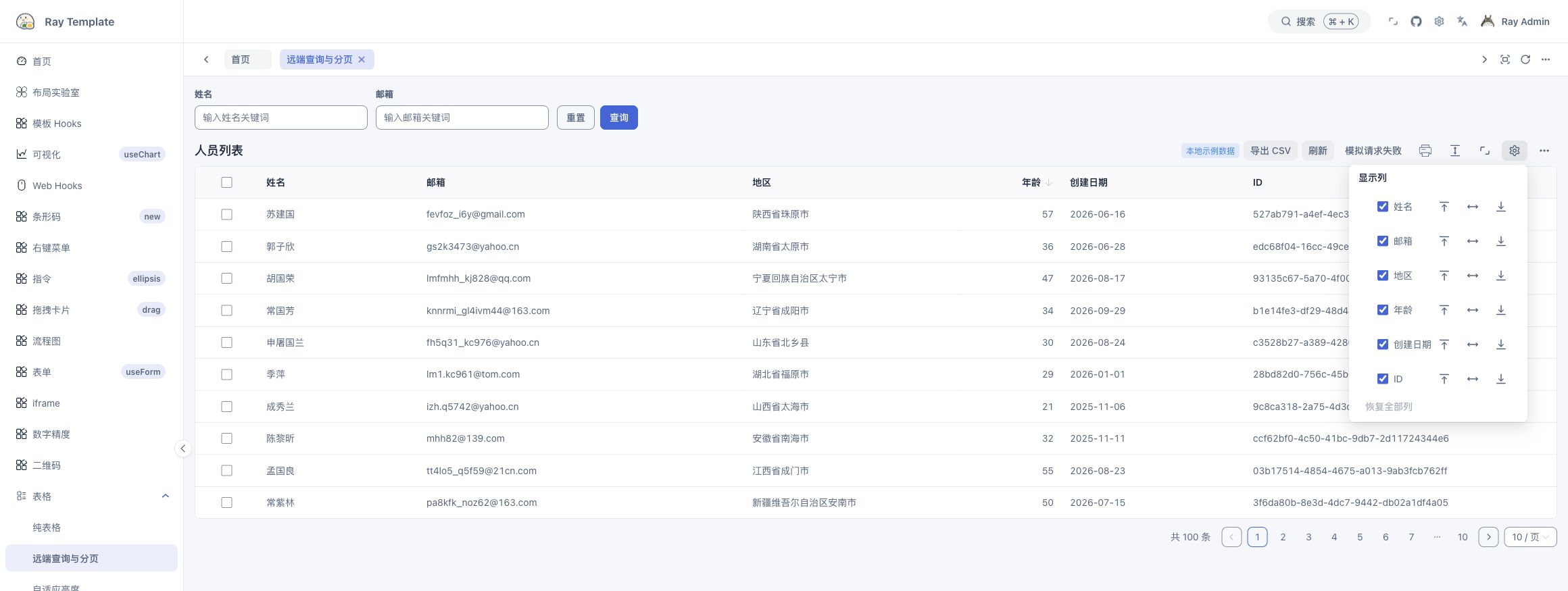
Try the live column settings example. Use stable, unique column keys. Column settings control visibility, root column order by drag or move buttons, pinning, and resizability. Group children follow the root column. Set columnStateKey to keep hidden columns after refresh. Include the account or tenant identifier in it when needed. The cache stores visibility only. With v-model:columns, the caller receives complete definitions including hidden columns. Reset column layout preserves visibility. In controlled mode, supply onResetColumnLayout to restore your column definitions.
Copy a table image
Copy table image copies the table header, rows, visible internal scroll area, and native paginator as PNG for pasting into a chat or document. The image excludes the title, filters, toolbar, notices, tableFooter, and tableAction. It preserves current scroll position and pinned columns. Capture is limited to the table's visible DOM box. Virtual scrolling captures rendered rows only and makes no additional page requests.
const [register, { copyImage }] = useTablePro()

<RTablePro onRegister={register} columns={columns} data={rows} copyImageOptions={{ pixelRatio: 1 }} />
<NButton onClick={() => void copyImage()}>Copy table image</NButton>
showCopyImage={false} hides the button. The instance and hook still expose copyImage(options?). Output is PNG. copyImageOptions supports pixelRatio, background, dimensions, styles, filters, fonts, and resource request options. Call options take precedence. The default device pixel ratio is capped at 2. The filter callback receives temporary snapshot nodes, so match classes or data attributes.
Call directly from a click handler before awaiting another task. Image rendering can be asynchronous, but the clipboard call needs user activation. The implementation passes a Promise<Blob> to the native ClipboardItem up front. WebKit Clipboard API
A successful write returns true. Loading, duplicate calls, unconfirmed data, cancellation, and failure return false. Use HTTPS or localhost, a browser that supports writing PNG, and clipboard permission. Permission, resource, and rendering failures have feedback. Data replacement or unmount cancels pending rendering and removes temporary nodes. The browser retains writes it already accepted. Cross-origin images, fonts, and protected canvases remain subject to browser policy. Use CSV or print for complete current-page rows.
Same-origin RIcon sprites and local #symbol icons are expanded in the snapshot with their static geometry, dimensions, and currentColor. Imported IDs are omitted. Fetches are limited to registered same-origin sprites or public .svg files, with credentials omitted and redirects rejected. One operation accepts up to 16 files and 1 MiB per file. Nested references, paint servers, stylesheets, and dynamic CSS values are unsupported. Snapshots strip scripts and inline event handlers and reject active iframe/object/embed/audio/video elements.
Printing and CSV
Try the live print and CSV example. Both use visible data columns on the current page by default. Printing creates a separate table with current filters and sorting. Vue cells, actions, expanded content, and merged layouts are outside that rendering. For a custom report, set printTableOptions.target to an element, ref, or getter. By default it copies host stylesheets, the root theme, and current ordinary form values. Set includePageStyles: false to opt out of page styles. A call can supply title and dedicated style. Use print CSS for layouts that depend on outside ancestors, scripts, or embeds. Password and file values are omitted. Physical printing is handled by the browser.
For CSV, keepOriginalData exports the entire batch supplied to the table. It does not fetch other remote pages. Exclude a column with allowExport: false. getCsvCell and getCsvHeader return raw text, and the component escapes CSV fields.
Full TablePro contract · Table examples · What changed in v6
Props, events, and slots
Naive UI DataTable still owns column definitions, selection, expansion, loading, empty states, and virtual scrolling. These options are provided or overridden by TablePro.
| Option | Default or behavior |
|---|---|
bare | Off. Removes the card appearance and hides the title and toolbar. Pagination is off when omitted. Explicit search and footer slots still work. |
autoHeight | Off. Enables DataTable flexHeight when the workspace provides height. |
tool | On. Controls image copying, density, fullscreen, column settings, and appearance. The custom toolbar remains available. |
title | String or VNode. A title slot takes precedence. |
pagination | On in standard mode. false disables it. Objects pass through to Naive UI Pagination. Below 600 px, the default is simple mode. Explicit simple takes precedence. |
pageSize | Default 10. pagination.pageSize takes first precedence, then pagination.defaultPageSize. Remote mode reads pagination.defaultPage for its initial page. |
request / params | request enables TablePro-managed remote data. Deep changes to params trigger a new query from page 1. |
search | Supports legacy field arrays, TableProSearchOptions, and false. Advanced search |
rowKey | Defaults to row.id ?? row.key. Supply a stable key if neither exists. |
columnStateKey | Persistence is off by default. Provide a stable identifier to remember hidden columns. |
downloadCsvTableOptions | CSV defaults. The template uses fileName and keepOriginalData. |
onResetColumnLayout | Controlled column layout reset callback. Update columns in the callback. |
printTableOptions | target, title, style, includePageStyles, formatHeader, and formatCell. |
showPrint | false. Controls the print item under More actions. print() remains callable. |
showCopyImage | true. Controls the built-in PNG button. copyImage() remains callable. |
copyImageOptions | PNG rendering defaults that copyImage(options) can override. Copy a table image |
contextMenuOptions / onContextMenuClick | Row menu items and callback (key, option, { row, index }). Open with right-click, Shift+F10, or the Menu key. A row handler can call preventDefault(). |
Common events include onRequestError(error) (or SFC @request-error), onUpdatePage, onUpdatePageSize, and onUpdate:columns. Internal updates and controlled callbacks use the same entry points. For controlled values, update them in the caller. Row selection and sorting follow DataTable events. Put server-side sort parameters in params.
Pagination objects use TableProPagination. Replace the old pagination.onChange/onPageSizeChange and top-level onPageChange/onPageSizeChange with onUpdatePage/onUpdatePageSize or onUpdate:page/onUpdate:pageSize. The native paginator no longer receives the old fields.
| Slot | Parameters and location |
|---|---|
filters | Above the table. Receives { submit(values) } for string- or number-keyed filters. Submit returns to page 1. Takes precedence over built-in search. |
title / toolbar | Left title area and right action area. Both are hidden in bare mode. |
notice | Custom notice in normal conditions. |
error | Replaces notice after failure if supplied. Receives { reload } and replaces the default toast. |
tableFooter / tableAction | Extra regions after DataTable. |
| Other slots | Forwarded to Naive UI DataTable, including loading and empty state. |
TableProInst.reload(resetPage?), setPage(page), and setPageSize(size) return Promise<void>. Request errors use events, so promise completion alone does not establish business success. getTableInstance() may be null. print(options?) returns Promise<boolean> indicating whether a preview was requested. downloadCsv(options?) initiates a browser download. copyImage(options?) reports whether a PNG was written to the clipboard.
Remote requests merge params and applied filters, with the latter taking precedence, then write pagination fields. Disabling pagination removes any supplied page and pageSize. total must be a nonnegative safe integer and data an array. If filtering or deletion leaves the current page outside the result range, TablePro moves to the final page and queries it when results exist.
TablePro Props · Remote queries and pagination · Table panel